
Every codebase with server rendering has a drawer full of small lies it tells about the browser. A component needs localStorage, or the device time zone, or window.innerWidth, none of which exist on the server. So the code pretends. Either it renders nothing until an effect flips a mounted flag, or it checks typeof window in the middle of render and hopes the two environments never compare notes.
React 19.3, released on September 9, 2026, gives that drawer a proper name. React DOM now ships browser(), a small function with an opinion: if a component cannot produce meaningful HTML on the server, it should say so, suspend, and let its Suspense fallback stand in the HTML until the browser takes over. No flag state. No environment sniffing. And because the bailout is a declared event rather than a hack, React can report it, which is where onBrowserBailout comes in.
The status, before the code
Getting this wrong is easy, because the launch coverage disagreed with itself. Some of it described browser() as Canary-only even as 19.3 shipped. Here is what the primary sources say today, October 31, 2026:
browseris part of React 19.3, the release that also stabilized View Transitions and Fragment Refs. The current install target in the 19.3 line is 19.3.1:npm install [email protected] [email protected].- The react.dev reference pages for
browserand forusecarry no Canary banner today. The TypeScript types ship in@types/react-dom19.3.0, with the declaration marked@version 19.3.0. - One honest caveat: in the release post, the React team used the word "stable" for View Transitions and Fragment Refs, and did not use it for
browser. It shipped, it is documented, and the playground below runs it on the stable npm package. It did not get a graduation speech. Pin your version and read the changelog when you upgrade, which is good advice for any API this new.
The following SSR examples and reported callbacks were exercised on pinned 19.3.1, and the hydration behaviour was verified in a real browser by the companion playground's smoke test; the streaming-abort path is documented, but not independently tested here.
First, the crash the patterns are avoiding
Strip the workarounds away and the underlying problem is simple. A component that reads localStorage during render, rendered on a server, does not produce a wrong answer. It throws. localStorage is not defined in that environment, the render dies, and whatever error boundary catches it decides what the user sees instead. Browser-only values are not a styling problem or a data problem. They are an environment problem: the code is correct in exactly one of the two places React will run it.
So every team builds a small machine for keeping those components out of the server render. The machines work. They are just all handmade, all slightly different, and none of them tell you when they run.
The two patterns it replaces
The React team's own release post names the workarounds. The first is the mounted gate:
export function MountedDraft() {
  const [mounted, setMounted] = useState(false);

  useEffect(() => {
    setMounted(true);
  }, []);

  if (!mounted) {
    return <p>Loading saved draft...</p>;
  }

  return <p>{localStorage.getItem('draft') ?? 'No draft saved yet.'}</p>;
}
It works, and it costs you twice. The fallback is the first render everywhere, including in the browser, where the real content was available immediately. Then the effect runs, state flips, and the subtree renders a second time. Every browser-only component pays that tax, and the loading state it shows is a lie told to users whose machines were never loading anything.
The second pattern is the one in this post's title:
export function TypeofWindowBadge() {
  if (typeof window === 'undefined') {
    return <p>Loading viewport...</p>;
  }

  return <p>Viewport width: {window.innerWidth}px</p>;
}
This one answers a question mid-render, and the answer differs by environment. The server render produces the fallback. The client's first render, the one that has to match the server HTML for hydration, produces the real content, because window is right there. When the value feeds rendered output, the two renders disagree by construction. Sometimes React recovers quietly. Sometimes you get a hydration mismatch and a subtree thrown away and re-rendered on the client, which is the mounted gate's cost again, paid through the error path instead of the front door.
The pattern: declare it, then suspend
Here is the replacement, from the playground. A settings page has a saved-draft panel whose content lives in localStorage:
import { use, useState } from 'react';
import { browser } from 'react-dom';

// This component cannot produce meaningful HTML on the server:
// the draft lives in localStorage, which only exists in the browser.
// use(browser(...)) opts the component out of server rendering.
// On the server it suspends and the nearest <Suspense> fallback is
// sent in the HTML. In the browser it returns undefined and the
// component renders normally.
export default function SavedDraft() {
  use(browser('SavedDraft reads the draft from localStorage.'));

  const [draft] = useState(() => localStorage.getItem('draft') ?? '');

  return (
    <section>
      <h2>Your saved draft</h2>
      {draft ? <p>{draft}</p> : <p>No draft saved yet.</p>}
    </section>
  );
}
Three details do the work:
browseris imported fromreact-dom, and its return value is passed tousefromreact. Callingbrowser()on its own does nothing. The docs are blunt about this: pass the value touse, and do not throw it.- The string argument is a reason. It is not decoration. It becomes the
causeof the error React reports toonBrowserBailouton your server, which is covered below. - After the
use(browser(...))line, the component readslocalStorageduring render with no guard at all, because on the only renders that reach that line,localStorageexists.
The component cannot stand alone on the server, so it gets a Suspense boundary, like anything else that suspends:
import { Suspense } from 'react';
import SavedDraft from './components/SavedDraft';
import ViewportBadge from './components/ViewportBadge';

export default function App() {
  return (
    <main>
      <h1>Post settings</h1>
      <p>This intro renders on the server.</p>
      <Suspense fallback={<p>Loading saved draft...</p>}>
        <SavedDraft />
      </Suspense>
      <Suspense fallback={<p>Loading viewport...</p>}>
        <ViewportBadge />
      </Suspense>
    </main>
  );
}
The second boundary wraps a component that reads window.innerWidth the same way:
import { use } from 'react';
import { browser } from 'react-dom';

// window.innerWidth has no server value. Instead of guarding the
// read with typeof window, the component declares itself
// browser-only and reads the value directly.
export default function ViewportBadge() {
  use(browser('ViewportBadge reads window.innerWidth.'));

  return <p>Viewport width: {window.innerWidth}px</p>;
}
What the server actually sends
This is the part worth seeing rather than imagining. Rendering that App with renderToPipeableStream from react-dom/server, pinned at 19.3.1, produces HTML like this (excerpted, with the second boundary's identical marker trimmed). The excerpt is an example captured on the tested build in development mode, not a stable HTML contract:
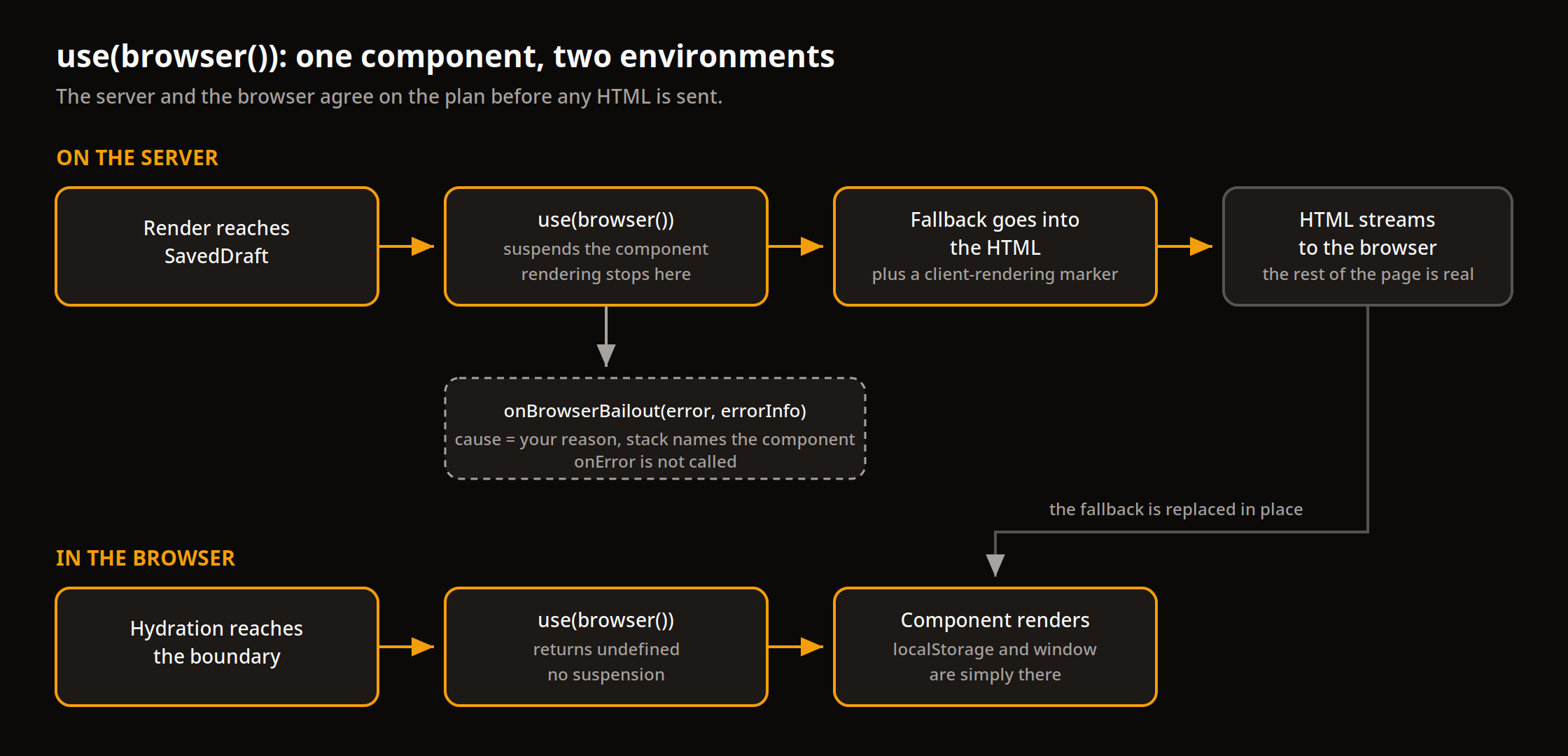
<main><h1>Post settings</h1><p>This intro renders on the server.</p><!--$!--><template data-dgst="" data-msg="Switched to client rendering because a component requested it." data-cstck="..."></template><p>Loading saved draft...</p><!--/$--></main>
Read it closely. The ordinary content is real HTML. The browser-only subtree is its fallback paragraph, wrapped in Suspense boundary comments, plus a template marker whose message says exactly what happened: the rendering switched to the client because a component requested it. Nothing rendered halfway. Nothing guessed at a localStorage value and hoped. The server and the client agreed on the plan before the HTML left the building, which is the entire difference from the typeof window version: there, the disagreement was discovered during hydration; here, it is recorded in the document.
When the page hydrates, React renders the suspended components in the browser, use(browser()) returns undefined, and the fallback is replaced in place. The draft text and the viewport width appear where the placeholders were.
That replacement is verified, not just documented. The companion playground's smoke test served this page to a real Chromium, seeded a draft in localStorage before load, and watched both fallbacks get replaced by the draft text and the viewport width, with no console errors, no page errors, and no hydration mismatch warnings.
Notice what this means for every render after the first one. In the browser, use(browser()) never suspends, on the initial hydration or on any later navigation or transition. The fallback exists only in server-produced HTML. A component that bails out is not a component that loads; it is a component whose first server draft is a placeholder and whose every client render is immediate. That is a much smaller promise than the mounted gate made, because the mounted gate charged its extra render on every mount, forever, in every environment.
The observability half: onBrowserBailout
A declared bailout can be counted, and this is the part of the feature with the longest shelf life. Pass an onBrowserBailout callback to the server renderer and React reports every boundary it leaves for the browser. The playground's render helper wires it next to the ordinary error callback:
    const { pipe } = renderToPipeableStream(node, {
      onBrowserBailout(error, errorInfo) {
        const asError = error as { message?: unknown; cause?: unknown };
        bailouts.push({
          message:
            typeof asError?.message === 'string'
              ? asError.message
              : String(error),
          cause: asError?.cause,
          componentStack: errorInfo.componentStack ?? '',
        });
      },
      onError(error) {
        errors.push(error);
      },
Rendering the settings page produced two reports, one per boundary. The first one, with the component stack trimmed and the playground's absolute file path shortened, was:
{
  "message": "Browser-only rendering was requested by `browser()`.",
  "cause": "SavedDraft reads the draft from localStorage.",
  "componentStack": "at SavedDraft (src/components/SavedDraft.tsx:16:31) ... at Suspense ... at App"
}
Two facts in that output matter for production use:
- The reason arrives as
error.cause. Write reasons the way you would write log messages, because that is what they are. "SavedDraft reads the draft from localStorage" tells the person reading the report which subtree bailed and why, at 2 AM, without a code search. A reason can also be a function returning any value, including anErrorwith its own stack. React calls that function when a server renderer hits the bailout, and never calls it in the browser, so an expensive reason costs nothing on the client. React does not serialize the reason into the HTML. onErrorstayed silent. Across the playground's server tests, the error callback recorded zero calls while the bailout callback recorded two. The docs state the same contract from the other side: a recovered bailout does not call the renderer'sonError, and it does not surface later as a recoverable error inhydrateRooteither. Bailouts are telemetry, not failures, and they travel on their own channel. Wire that channel into whatever counts things for you, and you get a running total of how much of your page the server is not rendering, per route, per component, with stacks. That number is worth watching: track changes by route and reason across deployments, normalized by request volume.
The callback exists on the streaming renderers (renderToPipeableStream, renderToReadableStream) and on the prerender APIs used for static generation, so the report is available in both serving models.
What to do with the reports is a practice question, and the practical answers are unglamorous. Aggregate them by cause, because the reason string is a stable label you chose. Alert on new causes after a deploy, the same way you would alert on a new error type, because a new cause means a new hole in your server rendering that somebody added on purpose and nobody reviewed as a rendering decision. And keep a rough budget per route. A settings page with two bailed panels is a design. A landing page whose bailout count climbs every sprint is a slow-motion decision to stop server rendering, made one component at a time, and the report is the only place that decision is written down.
The rules that keep it working
Four constraints, all from the reference docs, two of them verified the hard way in the playground:
- The Suspense boundary is not optional. During server rendering, a component calling
use(browser())must sit inside one. Without a boundary there is nowhere for the fallback to live, and the render fails. The playground asserts this directly: renderingSavedDraftwith no boundary produced a shell error through the ordinary error channels, andonBrowserBailoutwas never called. A bailout with no fallback is an error, and React treats it as one. - In a Server Components app, the call belongs in a Client Component. A Server Component cannot call
use(browser()). Put'use client'on the file or move the call into a child Client Component, the same seam you already use for state and effects. The two mechanisms solve different halves of the same problem and are worth keeping separate in your head:'use client'decides which environment a module ships to, andbrowser()decides which environment a component renders in. A Client Component can still be server-rendered to HTML, which is exactly the casebrowser()exists for. browser()alone is inert. It returns an opaque value. Onlyuseacting on that value marks the component. This is deliberate: the value can also be handed to the renderer's abort path, which is the next section.userules still apply, including the useful one.use(browser())can be called conditionally, inside anifor after an early return, which most hooks cannot. That exception is what makes the next pattern possible.
Conditional bailout: server data when you have it
Opting out does not have to be unconditional. If the server can supply a decent default, render it and keep the HTML. Bail out only when there is nothing honest to render:
import { use } from 'react';
import { browser } from 'react-dom';

// Conditional bailout: when the server can supply a good default,
// render it into the HTML and never suspend. Only when there is
// no default does the component opt out of server rendering and
// read the value that only exists on the device.
export function useTimeZone(defaultValue?: string): string {
  if (defaultValue !== undefined) {
    return defaultValue;
  }

  use(browser('useTimeZone has no server default and reads the device time zone.'));

  return new Intl.DateTimeFormat().resolvedOptions().timeZone;
}

export default function TimeZoneBadge({
  defaultValue,
}: {
  defaultValue?: string;
}) {
  const timeZone = useTimeZone(defaultValue);
  return <p>Time zone: {timeZone}</p>;
}
Both branches are covered by tests in the playground. With defaultValue="America/Toronto", the server HTML contains the rendered value and the bailout callback records nothing. Without a default, the HTML carries the fallback and exactly one bailout is reported, with the hook's reason as its cause. The docs show the same shape wrapped around a data-fetching hook: if a loader already provided initial data, render on the server; if it did not, bail out and let the client fetch. The principle is the same in both. browser() is a valve, not a wall.
A framework switch is not the same thing
Most frameworks already offer a way to keep a component out of server rendering, usually a dynamic import option or a client-only wrapper, and the docs position browser() as an alternative to exactly that. The difference is where the decision lives. A framework switch lives outside the component, in the code that imports it, and it is enforced by the bundler. The component itself knows nothing about it, and neither does your server log. browser() lives inside the component, travels with it to any framework or to a hand-rolled Node server, and announces itself every time it fires. If your app is fully inside one framework and likely to stay there, the switch you already have is fine. The moment the component is shared, published, or rendered by more than one stack, the declaration that lives inside it starts to win.
The escape hatch: aborting a slow shell
One more documented behaviour rounds out the API. If you call the server rendering APIs directly, you can stop waiting on pending content and let the browser finish it: pass the value returned by browser() as the reason when you abort the render, through abort() on a pipeable stream or as the reason given to an AbortController. Pending Suspense boundaries stay in their fallback state, each recovered boundary is reported to onBrowserBailout, and, as with an ordinary bailout, onError is not called. It turns "the shell is slow" from a server timeout into a measured decision with the same telemetry attached. The playground does not exercise this path; it is documented behaviour, stated here as such.
When to leave the old patterns alone
Honesty about scope, in both directions:
- If your app never renders on the server, none of this is for you. In a purely client-rendered app, the mounted gate and the
typeof windowcheck are answering a question nobody asked.browser()exists for the seam between two environments. - Every bailout is a hole in your server rendering. The fallback is what first paint shows and what a crawler reads. A component that bails out gives up whatever the server would have put there, so reach for
browser()when the server version would be meaningless or wrong, not when it would merely be slightly less fresh. A time zone the server cannot know qualifies. A product title it can know does not. - The fallback is a real loading state now. It ships in the HTML and users see it on every cold load. Design it like one: sized like the content it replaces, quiet, and honest.
The change underneath all of this is small but real. Browser-only rendering used to be a private arrangement between a component and an effect, invisible to the framework and to your logs. In 19.3 it is a declared boundary with a name, a reason, and a report. Stop reaching for typeof window. Say which environment the component belongs to, and let React keep the receipts.
Sources
- React 19.3 release post, react.dev, September 9, 2026: https://react.dev/blog/2026/09/09/react-19-3
browserreference, react.dev: https://react.dev/reference/react-dom/browserusereference (theuse(browser())section), react.dev: https://react.dev/reference/react/userenderToReadableStreamreference (theonBrowserBailoutoption), react.dev: https://react.dev/reference/react-dom/server/renderToReadableStreamprerenderToNodeStreamreference (theonBrowserBailoutoption), react.dev: https://react.dev/reference/react-dom/static/prerenderToNodeStream- npm registry, react and react-dom package metadata (latest 19.3.1), read October 31, 2026
@types/react-dom19.3.0 type declarations forbrowserandonBrowserBailout, read in the companion playground, October 31, 2026- Companion playground: https://github.com/codedbyMo/react-browser-playground (react and react-dom 19.3.1; the server and client test suites quoted above, and the browser smoke test recorded in its smoke folder)